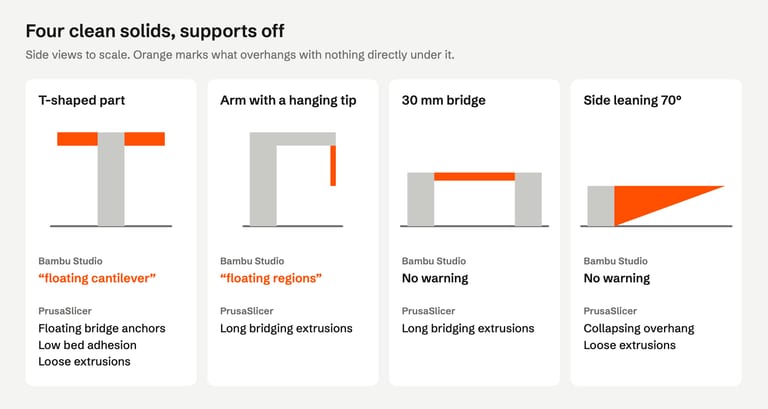
When you slice with supports off, Bambu Studio may stop to tell you: "It seems object model.stl has floating cantilever. Please re-orient the object or enable support generation." PrusaSlicer shows "Detected print stability issues" with a list such as "Floating bridge anchors" or "Collapsing overhang". Both messages come from the slicer looking at the shape of the part layer by layer, and both disappear the moment supports are switched on.
That makes them easy to misread. They are not mesh errors, so an STL repair tool cannot fix them, and enabling supports silences them whether or not the supports end up where you need them. We sliced 17 clean test parts and four public files to see when the warnings appear, what supports cost and when turning the part over is the better fix.
What the warnings mean#
| Slicer | Message | What its check found |
|---|---|---|
| Bambu Studio | "It seems object … has floating cantilever. Please re-orient the object or enable support generation." | An overhang that reaches more than 6 mm past what holds it up, or a contour with nothing under it at all |
| Bambu Studio | "It seems object … has floating regions. Please re-orient the object or enable support generation." | A small region that starts in mid-air: nothing under it in the layer below, such as a tip or spike pointing down |
| PrusaSlicer | "Detected print stability issues: … Consider enabling supports." | Any of: long bridging extrusions, floating bridge anchors, collapsing overhang, loose extrusions, low bed adhesion, floating object part, thin fragile part |
Bambu Studio runs this check only when supports are off, checks floating regions first and reports "floating cantilever" only when the farthest point is more than 6 mm out (Bambu Studio source, threshold). PrusaSlicer likewise collects its issues only for objects without supports (PrusaSlicer source).
Each message has its own page with our test files: floating cantilever and floating regions. A separate part floating above the rest is different again: it leaves layers with nothing in them, and Bambu Studio refuses to slice with an empty layer error instead.
When the warning appears, and when it does not#
We sliced a 10 mm wall with a ledge sticking out from 2 to 20 mm, and a block with one side leaning from 30° to 80° from vertical, twice each in Bambu Studio 02.08.02.61: supports off, then supports on.
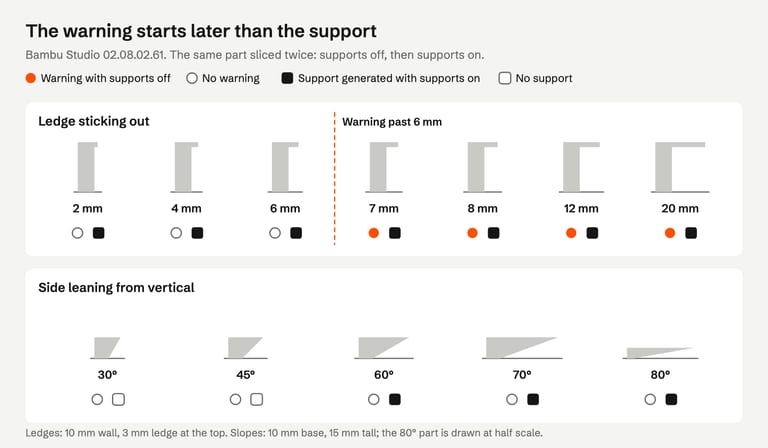
Ledges: the "floating cantilever" warning started at 7 mm; 2, 4 and 6 mm ledges sliced silently. With supports on, Bambu Studio supported all seven.
Slopes: no slope warned, even the one leaning 80° (85 mm out over 15 mm of height). With supports on, the slicer supported the 60°, 70° and 80° slopes and left 30° and 45° alone.
Bridges: two posts joined by a 30 mm bridge gave no Bambu warning; PrusaSlicer reported "Long bridging extrusions".
The support decision follows a different setting from the warning. Bambu Studio's Threshold angle generates support for surfaces whose slope to the horizontal is less than the threshold, 30° by default, which Bambu Lab calls "a safe angle to print without support" for most materials (Bambu Lab wiki). Our 60° slope is exactly 30° to the horizontal. PrusaSlicer's Overhang threshold works the same way, measured "from the horizontal plane" (Prusa Knowledge Base).
So the warning is a narrow alarm for parts that are clearly floating. For moderate overhangs, slice and look at the preview rather than relying on silence.
Three ways to deal with it#
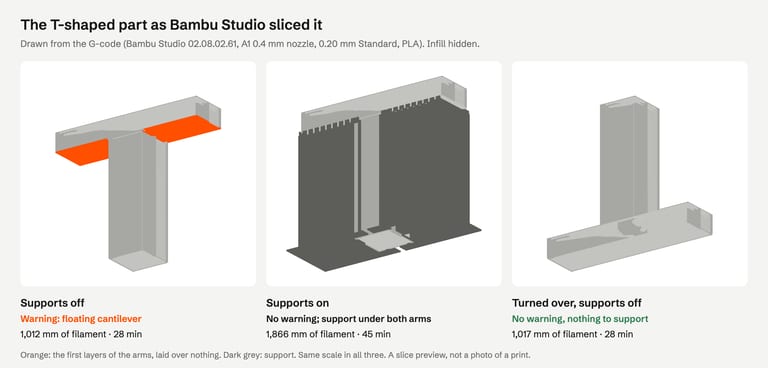
Here is the T-shaped part from our tests as Bambu Studio sliced it each way:
1. Turn the part over#
Bambu Studio's message suggests it first: "Please re-orient the object". The warning names the object, not the spot, so look for the overhang yourself. For many parts, a flat face that is currently on top can go on the plate.
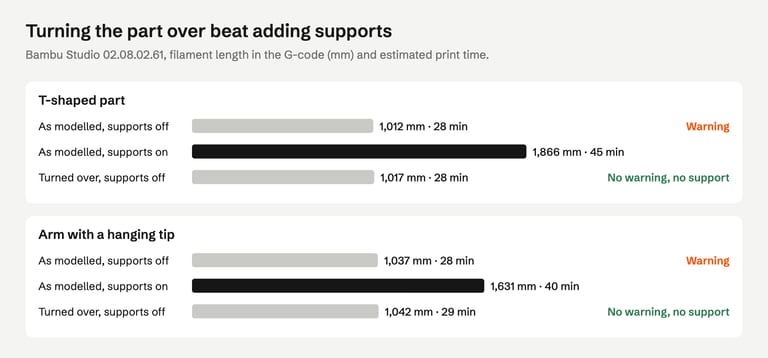
Our T-shaped part (a 40 mm bar on a 10 mm post) warned "floating cantilever". Turned upside down, with the bar on the plate, it sliced with no warning in either program and nothing to support, using 1,017 mm of filament against 1,012 mm before. The arm with a hanging tip behaved the same way: no warning turned over, 1,042 mm against 1,037 mm.
Orientation also changes where layer lines run and which faces carry the support marks, so it is a design choice as much as a slicing one. For a part with overhangs in several directions, pick the side that leaves the smallest area hanging.
2. Enable supports#
In Bambu Studio, open the process settings, go to Support and tick Enable support ("Enable support generation", Bambu Studio source). In PrusaSlicer, supports "can be turned on from the right panel or in the Print settings - Support material - Generate support material" (Prusa Knowledge Base).
What it cost on our files, in Bambu Studio:
| File | Supports off | Supports on | Change |
|---|---|---|---|
| T-shaped test part | 1,012 mm, 28 min | 1,866 mm, 45 min | +84% filament |
| Arm with a hanging tip | 1,037 mm, 28 min | 1,631 mm, 40 min | +57% filament |
| Thingi10K 42291 (floating cantilever) | 625 mm | 761 mm | +22% filament |
| Thingi10K 1004826 (floating regions) | 484 mm | 673 mm | +39% filament |
| Thingi10K 48352 (floating regions) | 3,242 mm, 104 min | 7,072 mm, 202 min | +118% filament |
| Thingi10K 109923 (floating regions) | 1,031 mm | 1,318 mm | +28% filament |
Turning supports on removed the warning in every run, in both programs. That is not proof that the overhang is now held up: both slicers skip the check entirely when supports are on. PrusaSlicer dropped its "Long bridging extrusions" warning on the 30 mm bridge while adding no support at all, because its Don't support bridges option is on by default (Prusa Knowledge Base). Step through the sliced preview to the height of the overhang and check that support reaches it.
3. Change the model#
If the overhang is part of the design and you print it often, change the shape under it: our 45° slope sliced without a warning and needed no support even with supports on, so a 45° chamfer under a flat ledge is worth trying. Splitting the part into pieces that each print flat is another. That is an edit in your modeling program; no slicer or repair tool does it for you.
Why STL repair does not clear it#
A mesh repair closes holes, fixes flipped faces and removes broken geometry. It does not move surfaces, so the shape the slicer sees stays the same.
All 17 of our test parts were verified solids with no open, non-manifold or intersecting edges. FixSTL left every one unchanged, and the warnings stayed exactly where they were.
Four public files that warned (Thingi10K 42291, 1004826, 48352 and 109923) still warned after FixSTL repaired them, including two that became verified solids.
There is one case where the file is the cause. A block exported together with its boolean cutter, a cylinder reaching 9 mm below the block, warned "floating cantilever": the slicer puts the lowest point on the plate, so the block sat in the air on top of the cutter. FixSTL reported overlapping parts. Deleting the cutter in the modeling program and exporting again is the fix; see overlapping parts.
So: if the overhang is meant to be there, it is a slicing decision. If it should not exist, check the file.
How we tested#
Bambu Studio 02.08.02.61 (Bambu Lab A1, 0.4 mm nozzle, 0.20 mm Standard, Bambu PLA Basic, supports normal(auto) at a 30° threshold when on) and PrusaSlicer 2.9.6 (defaults, 0.4 mm nozzle, 0.2 mm layers) on macOS, from the command line, on 29 October 2026. Filament and time are the programs' own G-code estimates. The public files are from the Thingi10K dataset, all CC BY-SA, by Tunell (42291), mz4250 (1004826), rweaving (48352) and adamrw91 (109923).
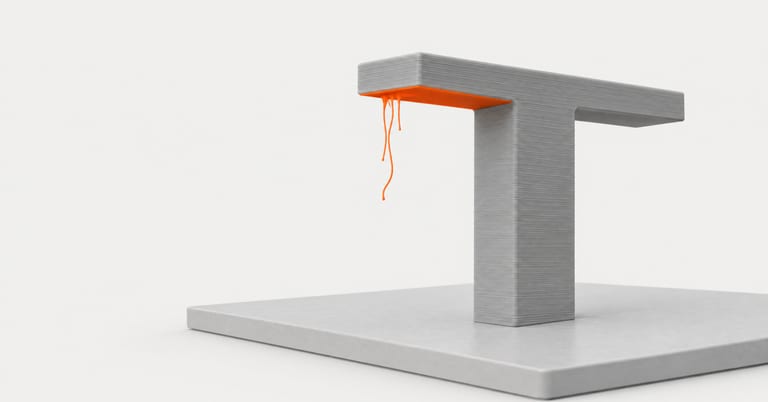
The image at the top of this page is an AI-generated illustration (Higgsfield, GPT Image 2.5), not a photo of a print or a slicer screenshot. The slice previews are drawn from the G-code the slicer wrote; nothing was printed.
Not tested: OrcaSlicer (its command line prints no slicing warnings), Cura, where the apps highlight the region on screen, other support types and angles, and actual prints. Support generation also varied slightly between runs on one public file, and one file warned in one run and not in four others, so a borderline region can come and go.
FAQ#
What does "floating cantilever" mean in Bambu Studio?#
Part of the model sticks out sideways more than about 6 mm past what is under it, and supports are off. The slicer would print that part on air. Turn the part so the overhang faces up or rests on the plate, or enable supports.
What does "floating regions" mean?#
A small piece of the model starts in mid-air, with nothing under it in the layer below: typically a tip, horn or spike pointing down. Re-orient the part so that piece points up, or enable supports.
How do I enable support generation in Bambu Studio?#
In the process settings, open Support and tick Enable support. With an auto support type, the slicer places support under surfaces flatter than the threshold angle, 30° to the horizontal by default. Slice again and check the preview.
Can STL repair fix a floating cantilever warning?#
No. The warning is about the shape, which repair does not change; our repaired files kept it. The exception is leftover geometry, such as an exported boolean cutter, that should be deleted in the modeling program.
Why did the warning disappear when I turned supports on?#
Bambu Studio and PrusaSlicer only run this check when supports are off. The warning disappearing does not confirm that support reaches the overhang; check the sliced preview.
What overhang angle needs support?#
Both Bambu Studio and PrusaSlicer decide by a threshold angle measured from the horizontal. Bambu Studio's default is 30°: surfaces flatter than that get support. Material, cooling and layer height move the real limit, so print a test if a part is borderline.
Sources#
Bambu Studio 02.08.02.61 source: support warning, floating regions and cantilever check, overhang detection, Enable support option
Bambu Lab Wiki, Support
PrusaSlicer 2.9.6 source, print stability alert; Prusa Knowledge Base, Support material
Thingi10K, dataset
FixSTL checks your STL for holes, non-manifold edges, overlapping parts and thin walls in your browser. If it finds none, an overhang warning is about orientation and supports, not repair.
Check whether it is the mesh or the shape