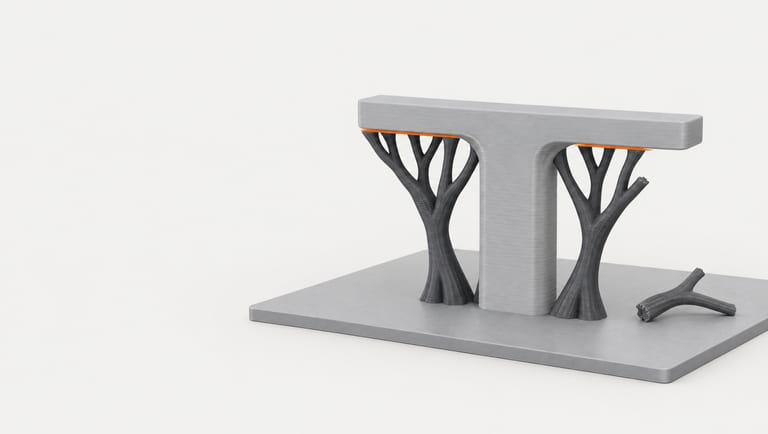
Tree supports touch a part at the tips of their branches, so they usually come away more easily than a block of normal support. When they do not, the cause is mostly set in the slicer: how big the gap is between the top of the support and the part, how dense the interface layers at the top are, and how close the support comes to the walls. Bambu Lab, Prusa and UltiMaker all describe the same trade-off: a bigger gap or a sparser interface comes off more easily and leaves a rougher underside.
We could test what each setting does to the G-code, so we did: two test parts and one public model, sliced in Bambu Studio, PrusaSlicer and Cura with one setting changed at a time. We did not print, so this page does not say how easily any of it comes off or how the surface looks. One result is worth knowing before you tune anything: in the default tree style of Bambu Studio and in PrusaSlicer's Organic supports, part of the top Z distance setting has no effect.
How to take tree supports off#
These steps come from the slicer makers; we did not print anything to test them.
Let it cool, then start by hand. Prusa: supports are "often easily removable with bare hands"; use pliers "to get a better grip in otherwise hard-to-reach places" (Prusa Knowledge Base).
Cut, don't pry, where it is stuck. "A scalpel or a utility knife can also be used to cleanly remove a piece of support that seems to be stuck to the model" (Prusa).
Protect your eyes. "Pieces of supports can be surprisingly sharp and are sometimes violently ejected in a random direction after removal" (Prusa).
Don't leave it for days with nylon or PVA. Bambu Lab: remove supports "within 2 hours" for materials that absorb moisture, such as PA, PA-CF and PVA; if they have become hard to remove, "dry them, let them cool down, and then remove the support" (Bambu Lab Wiki).
If that is a fight every time, change the settings below for the next print.
The settings that decide it#
| What it does | Bambu Studio / OrcaSlicer | PrusaSlicer | Cura | Bigger value |
|---|---|---|---|---|
| Gap between support top and part | Top Z distance (A1: 0.2 mm) | Top contact Z distance (default 0.2) | Support Top Distance | Easier to remove, rougher underside |
| Dense layers at the top of the support | Top interface layers (A1: 2) | Top interface layers (default 3) | Enable Support Roof | Better underside, more material |
| Spacing of those interface lines | Top interface spacing (A1: 0.5) | Interface pattern spacing (0 = solid) | Support Interface Density | Sparser: easier to remove, more sag |
| Gap to the part's walls | Support/object XY distance | XY separation | Support X/Y Distance | Easier to remove, smaller contact |
| Where tree branches touch | Tree support branch distance | Branch distance (Organic) | — | Fewer contact points, easier to remove |
Directions from the Bambu Lab Wiki ("Top Z distance value: bigger, Support structure removal: easier, Interface quality: lower"), the Prusa Knowledge Base ("Bigger XY separation … makes them easier to remove") and Organic supports, and Cura's own setting descriptions (fdmprinter.def.json). Defaults are those of the profiles we tested.
A top Z distance of 0 is for support filament only. Bambu Lab: when the interface is printed in the same filament as the part, "it's not recommended to be set to be 0 but about 0.2, or the support structure will be really hard to remove" (Bambu Lab Wiki).
Top Z distance: what you set and what you get#
The T-shaped test part has arms whose underside is exactly 30 mm up, so the gap can be read straight from the G-code: the top of the last support layer against the bottom of the first layer that prints the arm.
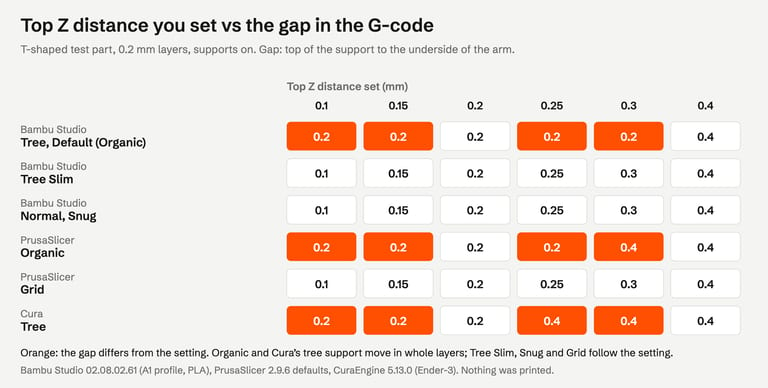
Bambu Studio, default tree style (Organic): 0.1, 0.15, 0.2, 0.25 and 0.3 mm all printed a 0.2 mm gap, with identical G-code; 0.4 printed 0.4. The table-shaped part gave identical G-code too, and on a public model support filament stayed within 0.2% from 0.1 to 0.3.
PrusaSlicer Organic: 0.1 to 0.25 printed 0.2 mm; 0.3 and 0.4 printed 0.4.
Cura tree: 0.1 to 0.2 printed 0.2 mm; 0.25 to 0.4 printed 0.4, as UltiMaker documents: the gap "can only be multiples of the layer heights; this will be automatically rounded up" (UltiMaker).
Bambu Studio Tree Slim and Normal, PrusaSlicer Grid: exactly the value set, 0.1 to 0.4.
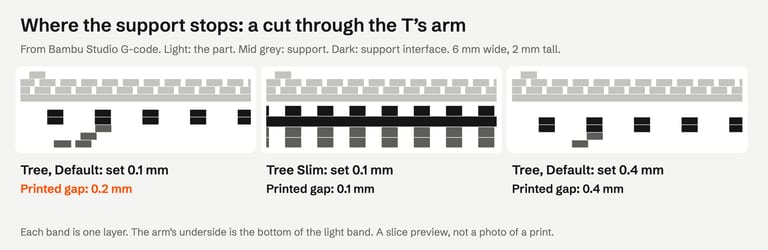
Why: organic supports work in whole object layers. Both programs compute the gap as a rounded number of layers (Bambu Studio TreeSupportCommon.hpp L280, PrusaSlicer TreeSupportCommon.cpp L113), and Prusa notes that Organic supports are synchronized with the object layers, while independent support layers let the slicer "follow the gap between the object and the support top surface precisely" (Prusa).
What to do with that:
With 0.2 mm layers, organic tree supports have two useful gaps: 0.2 or 0.4 mm. If 0.2 is too hard to remove, the next step is 0.4, not 0.25.
For a finer step, switch style. Tree Slim in Bambu Studio printed 0.15 and 0.25 mm as set; so did normal supports and PrusaSlicer Grid. In Bambu Studio, Tree Slim was also 11 minutes faster than the default style on the table-shaped part (32 vs 43 minutes).
Lower layer heights give finer steps with organic supports, since the gap is a whole number of layers. Not tested here.
Prusa suggests "values between 50-75% of the layer height" (Prusa). Grid printed those as set; Organic at 0.2 mm layers printed 0.2 for both 0.1 and 0.15.
Changing the gap barely changed cost on the two test parts: support filament moved by 2% at most in Bambu Studio and PrusaSlicer, print time by under a minute. In Cura, the 0.4 mm gap used 5% less support on the table-shaped part. On the public model, PrusaSlicer Organic with a 0.4 mm gap used 27% more support (178 vs 140 mm), and Tree Slim's support varied by up to 7% from one setting to the next.
Interface layers and spacing#
The interface is the dense top of the support that the part is printed on. More of it gives a flatter underside; Bambu Lab says that with no interface, "the supported area will lack sufficient underlying support during printing, which can cause lines to sag" (Bambu Lab Wiki). UltiMaker's description of interface density: "A higher value results in better overhangs, but the supports are harder to remove" (fdmprinter.def.json); Bambu Lab says the same of its denser interface patterns.
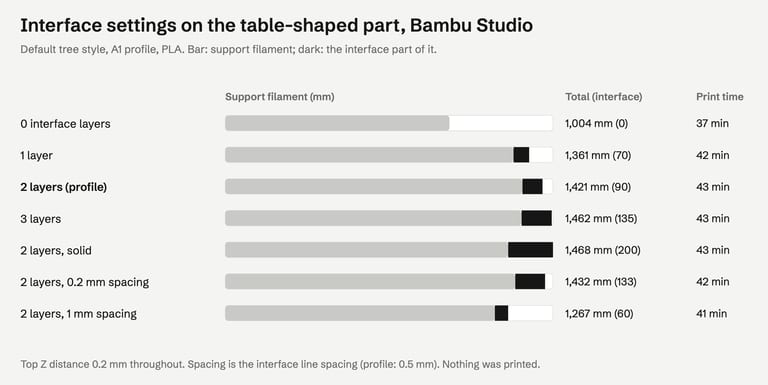
No interface layers: support filament on the table-shaped part fell from 1,421 to 1,004 mm (−29%) and the print from 43 to 37 minutes. On the T it fell 7%, on the public model 2%. The interface itself was only 90 mm; without it Bambu Studio built a different tree under the flat top.
More layers or solid interface: three layers or a solid interface (spacing 0) added about 3%; the solid interface used 200 mm of interface filament instead of 90.
Wider spacing (1 mm): 11% less support and 2 minutes less on the table-shaped part.
PrusaSlicer Organic, interface layers 3 → 0: 926 → 781 mm on the table-shaped part. Cura, support roof off: 1,238 → 940 mm, 134 → 122 minutes.
Fewer or sparser interface lines are the setting to try when the support is fused to the part over a large area; expect a rougher underside. That trade-off is the makers' description, not something we measured.
XY distance and branch settings#
XY distance (Bambu Studio, 0.2 / 0.35 default / 0.6 / 1 mm): support filament within 4% on the test parts, and 10% less at 0.2 mm on the public model. Prusa says a bigger XY separation "decreases the contact area of supports but makes them easier to remove and less prone to fusing to the model" (Prusa): it is the setting for supports stuck to a wall rather than under an overhang.
Branch distance (PrusaSlicer Organic, 1 → 2): identical G-code on all three parts, so on these shapes it changed nothing. Prusa and Bambu Lab both say a smaller branch distance touches the part at more points and is harder to remove (Prusa, Bambu Lab).
Before you reach for settings#
Turn the part. An overhang that is not there needs no support; our orientation guide has a bracket that needed 744 mm of support one way and none on its side.
Pick the style. Tree or normal, and where each puts support: tree vs normal supports.
Use support filament for the interface if your printer has a second material: then a top Z distance of 0 is possible (Bambu Lab).
The same gap-versus-hold trade-off applies to a brim; see brim in 3D printing.
How we tested#
Bambu Studio 02.08.02.61 (Bambu Lab A1, 0.4 mm nozzle, 0.20 mm Standard, Textured PEI Plate, Bambu PLA Basic, supports on, profiles loaded with their full inheritance), PrusaSlicer 2.9.6 (built-in defaults, 0.4 mm nozzle, 0.2 mm layers, supports on) and CuraEngine 5.13.0 with Cura's Creality Ender-3 definitions (tree support), on macOS, from the command line, on 30 October 2026. One setting was changed at a time. The gap, support filament (base and interface) and the cross-sections were read from the G-code; times are the slicers' own estimates. Parts: a T-shaped bar and a table-shaped part (both clean solids we generated, overhang at 30 mm) and Thingi10K model 1004826 (mz4250, CC BY-SA, from the Thingi10K dataset).
The image at the top of this page is an AI-generated illustration (Higgsfield, GPT Image 2.5), not a photo of a print. The other figures are drawn from our results and the slicers' G-code.
Not tested: printing, so how easily any support comes off, the marks it leaves and whether a 0.4 mm gap sags; layer heights other than 0.2 mm; support filaments; interface patterns; Bambu Studio's branch distance and diameter; OrcaSlicer (it uses the same settings as Bambu Studio but was not run here); Cura's app.
FAQ#
How do you remove tree supports?#
Let the print cool, then break the branches off by hand from the base up; use pliers in tight spots and a sharp knife where a branch is stuck to the surface. Wear eye protection. For nylon and other materials that absorb moisture, Bambu Lab says to remove supports within about two hours.
Why are my tree supports so hard to remove?#
Usually the gap above the support is small, or the interface is dense or fused to the part. Raise the top Z distance, but check the result: with 0.2 mm layers, organic tree supports in Bambu Studio and PrusaSlicer only print 0.2 or 0.4 mm, so a change from 0.2 to 0.25 does nothing.
What top Z distance should I use?#
Bambu Lab recommends about 0.2 mm when the support is the same material as the part, and 0 only with support filament. Prusa suggests 50–75% of the layer height. With organic tree supports the gap is a whole number of layers, so at 0.2 mm layers it is 0.2 or 0.4 mm.
Do interface layers make supports harder to remove?#
Bambu Lab says more interface layers give a better underside; UltiMaker says a denser interface is harder to remove. In our G-code, turning them off on a flat overhang cut support filament by 29%, but Bambu Lab warns the overhang will sag without them. We did not print to compare.
Does XY distance matter for tree supports?#
Mostly where support stands next to a wall. On our parts, XY distances from 0.2 to 1 mm changed support filament by at most 10%. A larger distance means less contact with the wall and easier removal, at the cost of support further from the edge it holds.
Sources#
Bambu Lab Wiki, Support
Prusa Knowledge Base, Support material, Organic supports
UltiMaker, Single extrusion support, Support settings; Cura 5.13.0 fdmprinter.def.json
Source code: Bambu Studio 02.08.02.61 TreeSupportCommon.hpp, PrusaSlicer 2.9.6 TreeSupportCommon.cpp
Thingi10K, dataset
FixSTL checks your STL for holes, non-manifold edges, overlapping parts and thin walls in your browser. Support settings cannot fix a broken mesh.
Check the file before you tune supports