Before slicing, every model gets one decision that no setting can undo: which side goes down. Orientation decides what hangs in the air and needs support, how tall the print is and so how long it takes, how much of the part touches the plate, and which direction the layer lines run.
We sliced an L-bracket three ways and a rod two ways in Bambu Studio and PrusaSlicer, and ran Bambu Studio's auto-orient on them and on four public models. Strength was not something we could test; for that we quote Bambu Lab's own figures.
Three ways to print one bracket#
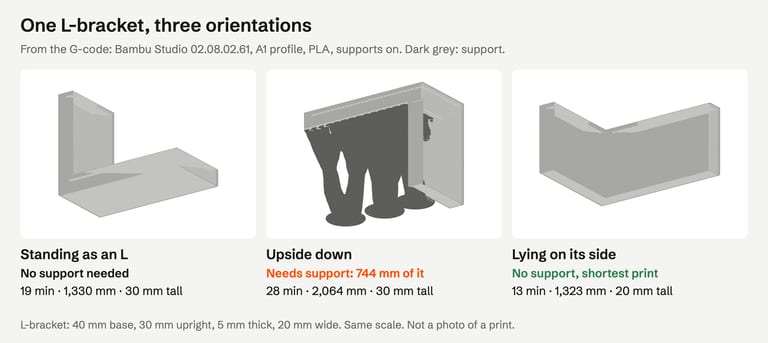
| Orientation | Support needed | Print time | Filament | Height | On the plate | Warnings with supports off |
|---|---|---|---|---|---|---|
| Standing as an L | none | 19 min | 1,330 mm | 30 mm | 780 mm² | none |
| Upside down | 744 mm | 28 min | 2,064 mm | 30 mm | 96 mm² | Bambu: "floating cantilever"; PrusaSlicer: Floating bridge anchors, Low bed adhesion, Loose extrusions, Long bridging extrusions |
| Lying on its side | none | 13 min | 1,323 mm | 20 mm | 314 mm² | none |
Bambu Studio, supports on (tree, the profile's default) for the time and filament columns; the warnings come from slicing with supports off. The bracket is 40 mm long, 30 mm tall, 5 mm thick and 20 mm wide.
Upside down, the 40 mm base became an overhang, and both slicers said so: Bambu Studio's message asks you to "re-orient the object or enable support generation" (what that warning means). Re-orienting was the better answer here. Lying on its side, the bracket was also 10 mm lower and 6 minutes faster than standing.
The side-lying bracket has less on the plate than the standing one (314 vs 780 mm²) and neither slicer warned about it. Which of the two is better depends on the part's job and on where you want the layer lines, below.
A rod: standing or lying#
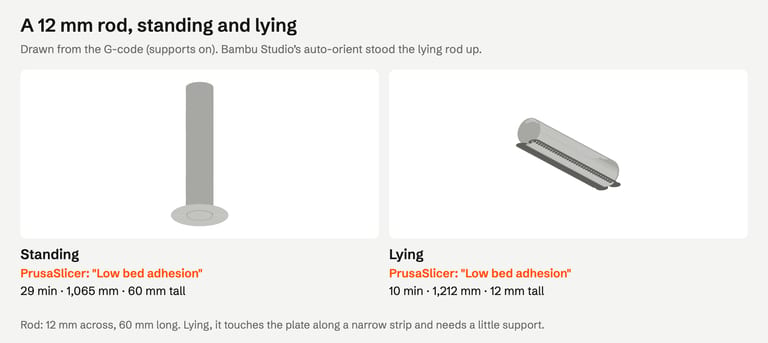
Standing, the 12 mm rod is 60 mm tall on a 12 mm circle, and PrusaSlicer warned "Low bed adhesion"; Bambu Studio added an auto brim. Lying down, it printed in 10 minutes instead of 29, with 58 mm of support along the curved underside, and PrusaSlicer still warned "Low bed adhesion": the round underside touches the plate along a strip only about 1.5 mm wide. A rod is a case where you trade a seam of support marks on one side for a third of the print time.
What Bambu Studio's auto-orient does#
Bambu Studio's Auto orient button picks a face to put down. Bambu Lab says it scores candidate orientations by a smaller overhang area, a larger bottom area, a larger convex hull of the bottom and no support on appearance surfaces (Bambu Lab Wiki); print time is not one of them (Bambu Studio source).
What it chose for our parts (command line, --orient 1, same engine as the button):
| Started as | Auto-orient chose | Result |
|---|---|---|
| Bracket upside down | Standing as an L | Support 744 → 0 mm, 28 → 19 min |
| Bracket on its side | Standing as an L | 13 → 19 min, still no support |
| Bracket standing | No change | 19 min |
| Rod lying | Standing | 10 → 29 min, the PrusaSlicer warning stays |
| Rod standing | No change | 29 min |
On four public models from Thingi10K (1004826, 48352, 109923, 42291), it kept the height unchanged; their support changed by −7%, 0%, −10% and +19%.
So auto-orient is a good first click for a model that arrives upside down. It does not look for the fastest print, and the wiki itself warns that bridges can mislead it. Compare its choice with the time estimate of the obvious alternative.
In PrusaSlicer, the Place on Face tool puts a face you click on the bed (Prusa Knowledge Base), like Bambu Studio's Lay on face (Bambu Lab Wiki).
Orientation and strength#
We did not test strength. Bambu Lab's data sheet for PLA Basic gives these figures for printed specimens, annealed and at 100% infill:
| Property | Along the layers (X-Y) | Across the layers (Z) |
|---|---|---|
| Tensile strength | 35 ± 4 MPa | 31 ± 3 MPa |
| Bending strength | 76 ± 5 MPa | 59 ± 6 MPa |
Source: Bambu PLA Basic Technical Data Sheet V3.0. Bambu Lab's troubleshooting guide puts it directly: "the strength in the Z direction is usually significantly lower than the strength in the X and Y directions. Therefore, if you require a high load-bearing capacity for a model, avoid having the layers bear the main load" (Bambu Lab Wiki).
For our bracket that points to lying it on its side: every layer then contains the whole L, corner included. Standing as an L, the corner is where the upright's layers start on the base, and a load that bends the upright pulls those layers apart. That is the general rule applied to this shape, not a test result. Other materials and settings have different numbers; check the data sheet of the filament you use.
A checklist before you slice#
Find the flattest large face and put it down (Lay on face / Place on Face).
Look for what hangs. If a large face hangs in the air, try the opposite side first.
Lower is faster. If two orientations need no support, compare the time estimates.
Look at the first layer. A small footprint on a tall part may need a brim.
Think about the load. If the part will be pulled or bent, keep the load along the layers.
Then decide on supports for whatever still hangs: tree vs normal supports.
Orientation does not fix a broken file, and a mesh repair does not change orientation. If the slicer reports errors about the mesh itself, check the file first.
How we tested#
Bambu Studio 02.08.02.61 (Bambu Lab A1, 0.4 mm nozzle, 0.20 mm Standard, Textured PEI Plate, Bambu PLA Basic; supports off, then on with the profile's tree(auto) Default; then auto-orient with --orient 1) and PrusaSlicer 2.9.6 (defaults, 0.4 mm nozzle, 0.2 mm layers, supports off) on macOS, from the command line, on 30 October 2026. The Bambu Studio profiles were loaded with their full inheritance, as the app uses them. Times and filament are the programs' own G-code estimates; first-layer area was measured from the G-code. Test parts are clean solids we generated. Public models from the Thingi10K dataset, CC BY-SA, by mz4250 (1004826), rweaving (48352), adamrw91 (109923) and Tunell (42291).
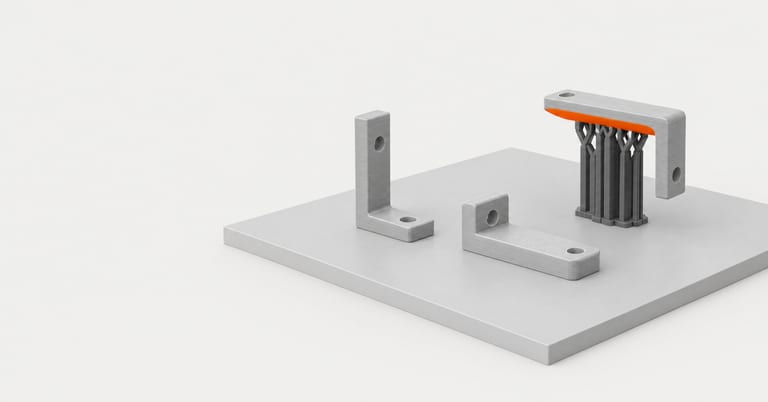
The image at the top of this page is an AI-generated illustration (Higgsfield, GPT Image 2.5), not a photo of a print. The slice previews are drawn from the G-code; nothing was printed.
Not tested: strength, surface finish and support marks, dimensional accuracy (holes printed on their side, for example), rotations other than 90° and 180°, OrcaSlicer and Cura, and auto-orient in the app's window.
FAQ#
What is the best orientation for 3D printing?#
There is no single one. Start with the orientation that needs the least support, then prefer the lower one for time, check that enough of the part touches the plate, and turn it so loads run along the layers if strength matters. Our bracket printed fastest on its side.
Does print orientation affect strength?#
Yes. Layers bond less strongly to each other than the plastic within a layer. Bambu Lab rates PLA Basic at 31 MPa tensile across the layers vs 35 MPa along them, and 59 vs 76 MPa in bending. Orient a part so the main load does not pull layers apart.
Should I trust Bambu Studio's auto orient?#
As a first step, yes: it fixed our upside-down bracket. It looks at overhang and bottom area, not print time, so it stood a rod and a bracket upright that printed 1.5 to 3 times faster lying down. Compare its choice with the alternative's time estimate.
How do I rotate a model onto a flat face?#
In Bambu Studio, select the model and use Lay on face (F), then click the face that should be on the plate. In PrusaSlicer, use Place on Face and click one of the white planes. Both put that face flat on the bed.
Why does my slicer say to re-orient the object?#
Bambu Studio says "Please re-orient the object or enable support generation" when part of the model floats or sticks out too far with supports off. Turning the part often removes the overhang entirely; see our overhang warnings guide.
Sources#
Bambu Lab Wiki: Auto Orientation, Top toolbar features, Common print quality problems, PLA Basic Technical Data Sheet
Bambu Studio 02.08.02.61 source: auto-orient cost function
Prusa Knowledge Base: First print with PrusaSlicer
Thingi10K, dataset
FixSTL checks your STL for holes, non-manifold edges, overlapping parts and thin walls in your browser. It does not choose an orientation; this guide covers that part.
Check the file, then pick a side