A print that comes loose or curls up at the corners is one of the most common failures in FDM printing, and the slicer is where you would hope to be warned. Two slicers do have a check. PrusaSlicer can list "Low bed adhesion" under "Detected print stability issues" and add "Also consider enabling brim." Bambu Studio's default brim type, Auto, decides for itself whether a part gets a brim.
We sliced 20 test parts in PLA, PETG and ABS to find out what those checks look at. The short version: both are about tall, narrow parts being knocked or pulled over. Neither looks for warping, and neither flagged a base tilted by 3° as an adhesion problem.
What each slicer checks#
| Slicer | What you see | What it calculates |
|---|---|---|
| PrusaSlicer | "Detected print stability issues: … Low bed adhesion … Also consider enabling brim." | Whether the part's weight, the print head's acceleration and a knock from the nozzle, acting at the height being printed, can tip it off its contact area. Only with supports off. |
| Bambu Studio | A brim around some parts, with brim type Auto (the default) | A brim width from the part's height, the shape of its first layer and the maximum print speed, doubled for PETG. Brims narrower than 5 mm are dropped. |
PrusaSlicer's check assumes the plate holds PLA weakly, PETG 15 times as well and ABS 5 times as well (PrusaSlicer 2.9.6 source), and counts a brim as extra contact area (source). Like its overhang warnings, it runs only for objects without supports (source).
Bambu Lab's wiki says Auto considers the part's shape, the filament and the print speed, and that ABS, PC and similar materials "usually" get a wider brim (Bambu Lab Wiki). In Bambu Studio 02.08.02.61 the part of the formula that uses the footprint and material is multiplied by zero (source); only PETG/PCTG (×2) and TPU (×0.5) change the result (source). In our runs ABS got exactly the same brims as PLA.
When the warning and the brim appear#
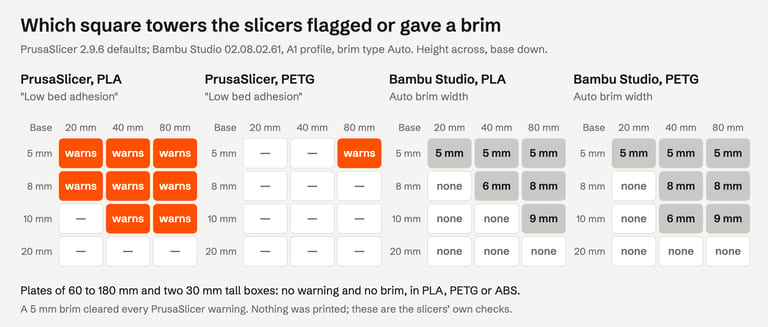
PrusaSlicer, PLA: every 5 and 8 mm tower warned, even at 20 mm tall; 10 mm towers from 40 mm. PETG warned only for the 5 × 80 mm tower and ABS for the 5 mm towers from 40 mm, because the check assumes those materials stick better.
Bambu Studio: auto brims of about 5 to 9 mm on the same kind of parts, slightly fewer than PrusaSlicer warned about. PETG got one more (10 × 10 × 40 mm).
Flat and large parts: plates of 60, 120 and 180 mm and boxes of 100 × 100 × 30 and 160 × 40 × 30 mm got no warning in PrusaSlicer and no brim in Bambu Studio, in PLA, PETG or ABS.
The second point matters most. If a large, flat ABS or ASA part is what lifts at the corners, the slicer will not have said anything.
What actually makes a first layer stick#
These come from the printer makers, not from our tests; nothing here was printed.
A clean plate. Bambu Lab: wash the plate "with hot water and detergent" before printing, which "solves most issues related to adhesion" (Bambu Lab Wiki). Prusa recommends 90% isopropyl alcohol for its sheets and warns that PETG can stick too well to smooth PEI without a separating layer such as glue stick (Prusa Knowledge Base).
The right plate type in the slicer. Bambu Studio sets the bed temperature from the plate type you pick, and on a Textured PEI Plate the printer lowers the nozzle by 0.04 mm; picking another plate type for a textured plate leaves the nozzle too high (Bambu Lab Wiki).
The right first-layer height. On Prusa printers that is Live Adjust Z and the first layer calibration; Prusa advises against squishing the first layer to make up for poor adhesion (Prusa Knowledge Base). Bambu Lab printers level the bed before a print; Bambu Lab suggests re-running bed levelling if adhesion is inconsistent (Bambu Lab Wiki).
Temperature and cooling. For warping, Bambu Lab lists a bed that is too cold, a chamber that is too cold and too much fan, and notes that ABS, ASA, PC, PA and similar materials shrink more (Bambu Lab Wiki). Prusa recommends an enclosure for high-temperature materials and keeping drafts away (Prusa Knowledge Base).
When to add a brim#
Prusa suggests a brim for "tall objects with a small base" and "multiple small objects at once", at least 3 mm wide (Prusa Knowledge Base), and both makers list it for corners that lift. In PrusaSlicer it is under Print Settings → Skirt and brim → Brim width; in Bambu Studio, Brim type in the Others settings, where you can switch Auto to an outer brim of a set width or paint brim ears onto corners (Bambu Lab Wiki).
What it cost in our runs:
| Part | Without brim (skirt only) | With a 5 mm brim | Part itself |
|---|---|---|---|
| 5 × 5 × 20 mm tower | 1.7 mm | 17.6 mm | 214 mm |
| 10 × 10 × 80 mm tower | 2.3 mm | 26.5 mm | 3,397 mm |
| 60 mm plate, 3 mm thick | 8.3 mm | 115.6 mm | 2,648 mm |
| 180 mm plate | 22.5 mm | 329.3 mm | 22,679 mm |
PrusaSlicer 2.9.6 filament estimates. A 5 mm brim cleared "Low bed adhesion" on every tower that had it. Whether it keeps a particular part down is something only a print shows.
If you rely on Bambu Studio's Auto brim for a large ABS part, check the preview: our 180 mm ABS plate and 100 mm ABS box got none.
When the file is the problem: a base that is not flat#
The slicer puts the lowest point of the model on the plate. If the base is tilted, even slightly, only a corner or an edge touches it.
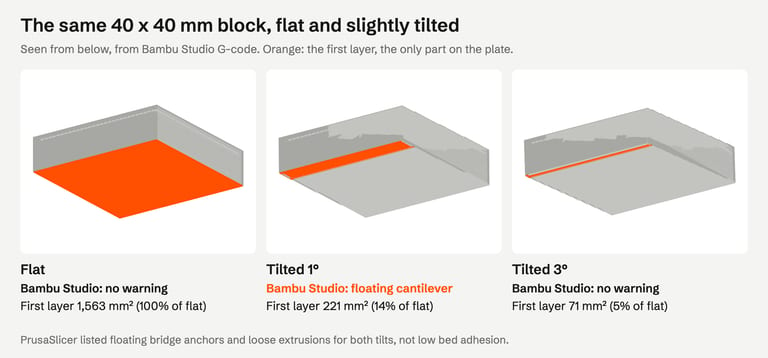
Our 40 × 40 mm block had 1,563 mm² of first layer when flat. Tilted 1°, only a 221 mm² strip touched the plate (14%) and Bambu Studio warned "floating cantilever". Tilted 3°, the first layer was 71 mm² (5%) and Bambu Studio said nothing. PrusaSlicer listed "Floating bridge anchors", "Loose extrusions" and "Long bridging extrusions" for both, but not "Low bed adhesion": its check looks at how hard the part is to knock over, not at a base that barely touches.
How to spot it: look at the first layer in the sliced preview, or at the part from the side. How to fix it:
In PrusaSlicer, the Place on Face tool aligns a face you click with the bed (Prusa Knowledge Base); in Bambu Studio, Lay on face (
F) on the top toolbar does the same (Bambu Lab Wiki).If the base is not quite flat in the model itself (a scan, or a sculpt without a flat bottom), flatten it in your modeling program, or cut the bottom off with the slicer's cut tool.
FixSTL does not catch this. A tilted solid is a perfectly valid mesh: no holes, no bad edges. Repair checks the file's geometry, not how it sits on the plate.
If the first layer is not just small but empty, the slicer refuses instead; see missing parts after slicing.
How we tested#
Bambu Studio 02.08.02.61 (Bambu Lab A1, 0.4 mm nozzle, 0.20 mm Standard, Textured PEI Plate; Bambu PLA Basic, PETG Basic and ABS; brim type Auto) and PrusaSlicer 2.9.6 (defaults, 0.4 mm nozzle, 0.2 mm layers, filament type PLA, PETG or ABS, with and without a 5 mm brim) on macOS, from the command line, on 30 October 2026. The Bambu Studio profiles were loaded with their full inheritance, as the app uses them. Brim width and first-layer area were measured from the G-code; filament figures are the G-code's own. Every test part is a clean solid we generated: square towers, plates, boxes and a block flat and tilted.
The image at the top of this page is an AI-generated illustration (Higgsfield, GPT Image 2.5), not a photo of a print. The other figures are drawn from our results and the slicers' G-code.
Not tested: actual prints, so whether any part stays down or warps; OrcaSlicer and Cura; the apps' windows, brim ears and Place on Face / Lay on face; rafts; the elephant-foot compensation setting; other printers' profiles.
FAQ#
Why is my 3D print not sticking to the bed?#
Most often a dirty plate, the wrong plate type selected in the slicer, or a first layer printed too high. Bambu Lab and Prusa both start there. If the slicer warned "Low bed adhesion", the part is also tall and narrow for its base: add a brim.
What does "Low bed adhesion" mean in PrusaSlicer?#
PrusaSlicer estimates that the part could be tipped off the bed during printing: its contact area is small for its height and weight. It is only checked with supports off. A brim adds contact area; in our tests a 5 mm brim removed the warning every time.
Does Bambu Studio add a brim automatically?#
Yes, with brim type Auto, the default. In version 02.08.02.61 it added a brim only to tall, narrow parts in our tests, about 5 to 9 mm wide, and none to large flat parts, even in ABS. Set an outer brim yourself if corners lift.
Will a brim stop warping?#
A brim holds the edges down and adds contact area; Bambu Lab and Prusa both recommend it for lifting corners. It does not change why a part warps (shrinkage as it cools), so for ABS, ASA and similar materials temperature, drafts and an enclosure matter too.
Can an STL file cause a bad first layer?#
Yes, if its base is not flat or the model is tilted: only an edge touches the plate. Check the first layer in the preview and use Place on Face (PrusaSlicer) or Lay on face (Bambu Studio). A mesh repair tool does not change this, because a tilted solid is not a broken file.
Sources#
PrusaSlicer 2.9.6 source: print stability alert, bed adhesion by filament type, stability calculation
Bambu Studio 02.08.02.61 source: auto brim width, material coefficient
Bambu Lab Wiki: Brim, First layer not sticking, Common print quality problems, Top toolbar features
Prusa Knowledge Base: First layer issues, Warping, Skirt and Brim, First print with PrusaSlicer
FixSTL checks your STL for holes, non-manifold edges, overlapping parts and thin walls in your browser. A clean report means a first-layer problem is about the bed, settings or orientation, which is what this guide covers.
Rule out the file first