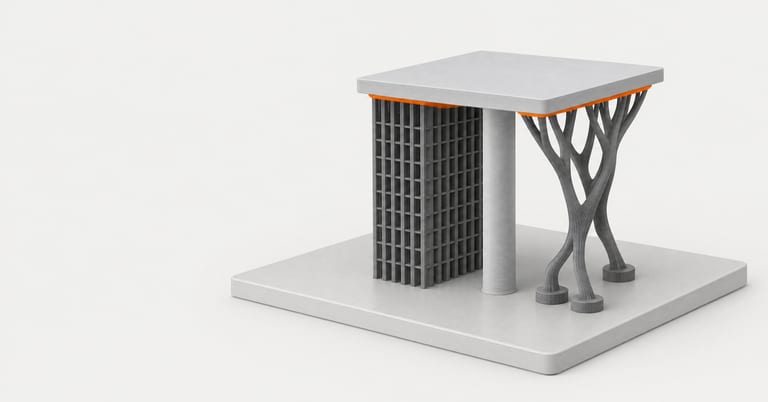
Every slicer can hold up an overhang two ways. Normal supports project the overhang straight down to the plate as a block; tree supports start from a few points under the overhang and grow branches down to the plate (Bambu Lab Wiki). PrusaSlicer calls its tree style Organic (Prusa Knowledge Base).
The usual advice is that tree supports use less material and come off more easily. We could test the first part from the command line: we sliced four test parts and two public models in every support style of Bambu Studio and PrusaSlicer and compared support filament, print time and where the support went. How easily supports come off and what marks they leave need real prints, which we did not make.
The styles, and what our A1 profile actually uses#
| Slicer | Type and style | What it is |
|---|---|---|
| Bambu Studio | normal(auto), Grid | Support area expanded and squared off to rectangles; the default normal style |
| Bambu Studio | normal(auto), Snug | Follows the overhang's outline without expanding |
| Bambu Studio | tree(auto), Slim | Merges branches aggressively for less support volume |
| Bambu Studio | tree(auto), Strong | Merges branches conservatively; stronger, sometimes harder to remove |
| Bambu Studio | tree(auto), Organic | Organic-shaped branches, ported from PrusaSlicer |
| Bambu Studio | tree(auto), Hybrid | Tree branches, with normal grid support under big flat overhangs |
| PrusaSlicer | Grid, Snug, Organic | Grid is very stable but spreads along walls; Snug keeps the overhang's shape; Organic grows branches |
Descriptions from the Bambu Lab Wiki and the Prusa Knowledge Base.
Bambu Studio's style list also has Default. With a tree type, Default means Organic unless you use a support filament or adaptive layer height, in which case it means Hybrid (Bambu Lab Wiki). That matched our runs: Default and Organic gave identical results on every part. The Bambu Lab A1 "0.20mm Standard" profile we used sets the type to tree(auto), so turning on Enable support in that profile gives you organic tree support.
Where the settings are: in Bambu Studio, the process settings' Support tab (Enable support, Type, Style, Threshold angle, On build plate only). In PrusaSlicer, Print Settings → Support material (Generate support material, Style, Support on build plate only).
What each style cost#
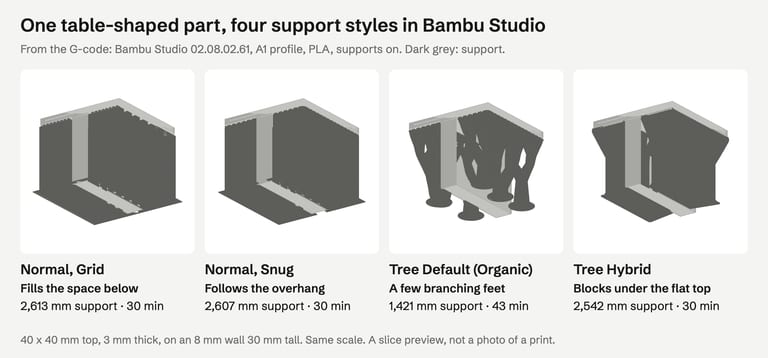
Here is one part, a 40 mm square top on a thin wall, in four Bambu Studio styles:
And all six Bambu Studio styles on six parts:
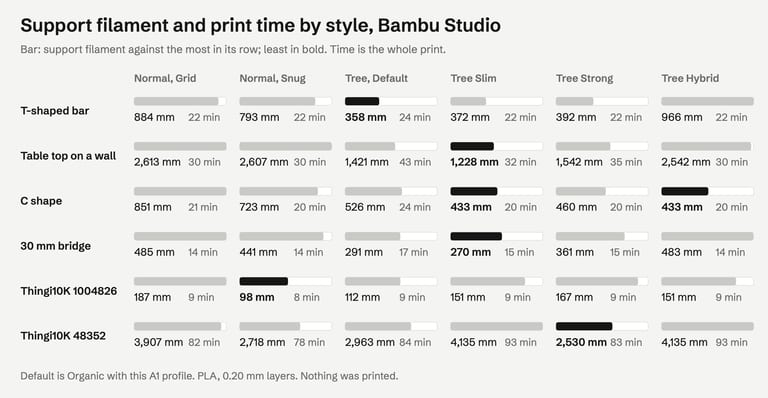
Tree vs normal on simple parts. Tree Default against Normal Grid: T-shaped bar 358 vs 884 mm of support, table 1,421 vs 2,613 mm, C shape 526 vs 851 mm, 30 mm bridge 291 vs 485 mm. The prints took 24 vs 22, 43 vs 30, 24 vs 21 and 17 vs 14 minutes.
On real models it varied. On Thingi10K 1004826, Normal Snug used 98 mm of support, Tree Default 112 mm and Normal Grid 187 mm. On 48352, Tree Strong used 2,530 mm, Tree Default 2,963 mm, Normal Grid 3,907 mm, and Tree Slim and Hybrid 4,135 mm each.
Snug used less than Grid on every part, from 0.2% (the table) to 47% (1004826).
PrusaSlicer, Grid → Organic, support filament: T 919 → 423 mm, table 1,826 → 926 mm, C 883 → 591 mm, 1004826 296 → 140 mm, 48352 3,233 → 1,662 mm. Print time: 56 → 56, 64 → 68, 41 → 47, 17 → 16 and 184 → 168 minutes.
Prusa describes Organic supports as "fast and cheap to print" (Prusa Knowledge Base), and Bambu Lab says tree supports give "less material, and less time cost" on complex models with small overhangs (Bambu Lab Wiki). On our files the material saving held in both slicers; the time saving appeared only on the larger public model.
One more difference: PrusaSlicer added no support under our 30 mm bridge in any style, because its Don't support bridges option is on by default (Prusa Knowledge Base). Bambu Studio supported it in every style.
"On build plate only" on a part that overhangs itself#
This option stops support from standing on the model. Prusa suggests it as "a really quick way to get rid of excess supports mostly on organic shapes" and adds: "Make sure to check the preview and verify that all parts are either supported or at an overhang angle manageable by the printer" (Prusa Knowledge Base). Our C-shaped part shows why.
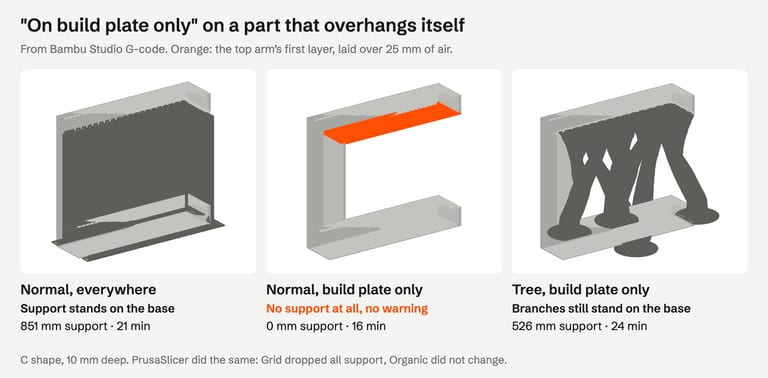
Normal support, build plate only: no support at all. The arm's first layer is a bridge over 25 mm of air. Same in PrusaSlicer with Grid.
Tree support, build plate only: the same branches as without the option, still standing on the base. Same in PrusaSlicer with Organic. Tree Slim changed slightly and also stood on the base.
No warning either way. Both slicers check for unsupported overhangs only when supports are off (see overhang warnings).
So "on build plate only" can remove support you need, and with tree support it may not do what it says. If you use it, step through the preview to the overhang's height.
Choosing a style#
Mostly small, scattered overhangs (figures, organic shapes): try tree (Organic in PrusaSlicer). It usually uses less material; check the time estimate too.
Large flat overhangs (shelves, lids, the underside of a box): Bambu Lab recommends normal support for surface quality there (Bambu Lab Wiki), and Tree Hybrid does that automatically. Snug used less than Grid on every part we tried.
When time matters more than filament: compare estimates. Normal Grid was faster than the default tree style on all four of our test parts.
Before any of it: see if turning the part removes the overhang. Our orientation guide has an L-bracket that needed 744 mm of support upside down and none on its side.
Support settings do not fix a broken file, and repairing a file does not remove an overhang: overhang warnings explains why.
How we tested#
Bambu Studio 02.08.02.61 (Bambu Lab A1, 0.4 mm nozzle, 0.20 mm Standard, Textured PEI Plate, Bambu PLA Basic, supports on, 30° threshold) and PrusaSlicer 2.9.6 (defaults, 0.4 mm nozzle, 0.2 mm layers, supports on) on macOS, from the command line, on 30 October 2026. The Bambu Studio profiles were loaded with their full inheritance, as the app uses them. Support filament was summed from the support features in the G-code; times are the programs' own estimates for the whole print. Test parts: a T-shaped bar, a table top on a wall, a C shape and a 30 mm bridge, all clean solids we generated. Public models from the Thingi10K dataset, CC BY-SA, by mz4250 (1004826) and rweaving (48352).
The image at the top of this page is an AI-generated illustration (Higgsfield, GPT Image 2.5), not a photo of a print or a slicer screenshot. The slice previews are drawn from the G-code; nothing was printed.
Not tested: how easily supports come off, the marks they leave, how stable tall supports are, support interface settings, support filaments, other threshold angles, painted supports and blockers, OrcaSlicer and Cura.
FAQ#
Are tree supports better than normal supports?#
They used less filament on most of our parts, 38–60% less on simple test parts, but the prints were not faster, and on one public model Normal Snug used the least of all. For large flat overhangs Bambu Lab recommends normal supports. Slice both and compare.
What is the default support type in Bambu Studio?#
The setting's own default is normal(auto), but the Bambu Lab A1 0.20 mm Standard profile we used sets tree(auto) with style Default, which is Organic unless you print with a support filament or adaptive layer height. Supports stay off until you tick Enable support.
What is the difference between Grid and Snug supports?#
Grid expands the support area into rectangles, which is stable but can spread along the part's walls. Snug follows the overhang's outline. Snug used less filament than Grid on every part we sliced, by up to 47%.
Does "support on build plate only" remove all supports?#
It removes support that would stand on the model. On our C-shaped part that was all of the normal support, leaving the overhang unsupported with no warning. Tree supports in both slicers did not change. Check the preview after enabling it.
Do organic supports print faster in PrusaSlicer?#
Not on our test parts: the same or longer than Grid, though they used a half to two thirds of the support filament. On a large public model Organic was 16 minutes faster. Compare the estimates for your model.
Sources#
Bambu Lab Wiki, Support
Prusa Knowledge Base, Support material
Thingi10K, dataset
FixSTL checks your STL for holes, non-manifold edges, overlapping parts and thin walls in your browser. Support settings cannot fix a broken mesh, and repair cannot remove an overhang.
Check the file before tuning supports