A brim is a flat band of plastic, one layer thick, printed around a part's first layer and joined to it. It gives the part more area on the plate and holds its edges down; you snap or peel it off afterwards. A skirt is a loop printed around the part without touching it, mainly to get the filament flowing. A raft is a plate printed under the part, which lifts the part off the bed (UltiMaker, Bambu Lab Wiki, Prusa Knowledge Base).
We sliced a set of test parts in Bambu Studio, OrcaSlicer, PrusaSlicer and Cura from the command line and read the G-code: what each slicer adds when you change nothing, what each option costs in filament and time, how wide a brim really is, and how close it sits to the part. Nothing was printed, so this page does not say how well a brim holds or how cleanly it comes off.
Skirt, brim or raft#
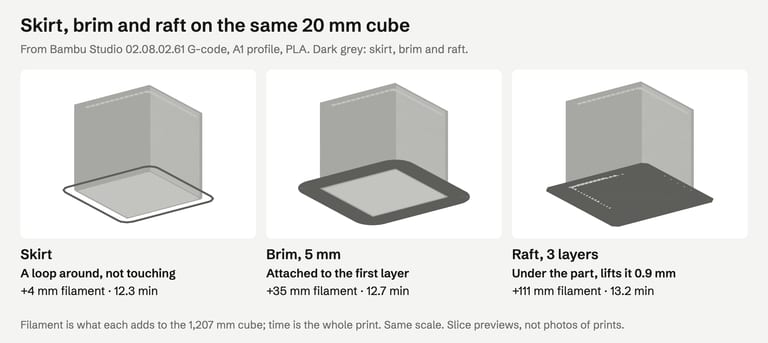
| 20 mm cube, added to the print | Bambu Studio | PrusaSlicer | Cura (Ender-3) |
|---|---|---|---|
| Skirt (default loop) | 4 mm, 12.3 min | 4 mm, 19.8 min | 32 mm, 29.3 min |
| Brim | 35 mm (5 mm wide) | 44 mm (5 mm + skirt) | 105 mm (8 mm default) |
| Raft | 111 mm (3 layers) | 293 mm (3 layers) | 780 mm (default raft) |
| Raft: time added over skirt | +50 s | +3.2 min | +11 min |
| Raft: part's first layer at | 1.1 mm | 1.1 mm | 1.66 mm |
Filament in millimetres of 1.75 mm filament, from the G-code; the cube itself used 1,207–1,483 mm depending on the slicer, so compare within a column. Times are each slicer's own estimate for the whole print.
How the makers describe them:
Skirt: primes the nozzle and shows whether the first layer sticks before the part starts (Prusa, UltiMaker).
Brim: for "tall objects with a small base" and "multiple small objects at once", at least 3 mm wide (Prusa); for tall, thin parts and materials that shrink, such as ABS (Bambu Lab, UltiMaker).
Raft: when the bottom of the model is not flat or sticks poorly (UltiMaker), or for warp-prone materials such as ABS (Bambu Lab).
A raft also changes the bottom surface: the part's first layer sits on the raft, not on the plate. In PrusaSlicer, a raft did not clear the "Low bed adhesion" warning on our 8 mm tower, and PrusaSlicer prints no brim when a raft is on (its own description of Brim width: "When raft is used, no brim is generated").
What each slicer adds by default#
| Slicer (profile) | Default adhesion | Brim when you choose one | Brim-to-part gap | Skirt |
|---|---|---|---|---|
| Bambu Studio 02.08.02.61 (A1) | Auto brim | 5 mm | 0.1 mm | none |
| OrcaSlicer 2.4.2 (same A1 profile) | Auto brim | 5 mm | 0.1 mm | none |
| PrusaSlicer 2.9.6 (built-in) | none (brim width 0) | the width you set | 0 mm | 1 loop, 6 mm away |
| Cura 5.13.0 (Creality Ender-3) | Skirt | 8 mm (20 lines) | 0 mm | 3 lines, 10 mm away |
From the G-code of a 20 mm cube and the profiles each run loaded. Other printer profiles set their own values: Prusa's own printer profiles keep the brim at 0 but use a 0.1 mm gap and a 2 mm, three-layer skirt, and Cura's base definition, used by UltiMaker printers, defaults to a brim (fdmprinter.def.json; the Ender-3 changes it in creality_base.def.json).
Where to set it: Bambu Studio and OrcaSlicer, Others → Brim type (and Brim width, Brim-object gap); PrusaSlicer, Print Settings → Skirt and brim; Cura, Build Plate Adhesion Type in the Custom settings.
How Auto decides#
In Bambu Studio, Auto gave brims only to tall, narrow parts in our earlier tests, and none to flat plates or large ABS boxes; our first-layer guide has those results and the formula behind them. OrcaSlicer uses the same Auto option with the same profile, and it does not decide the same way:
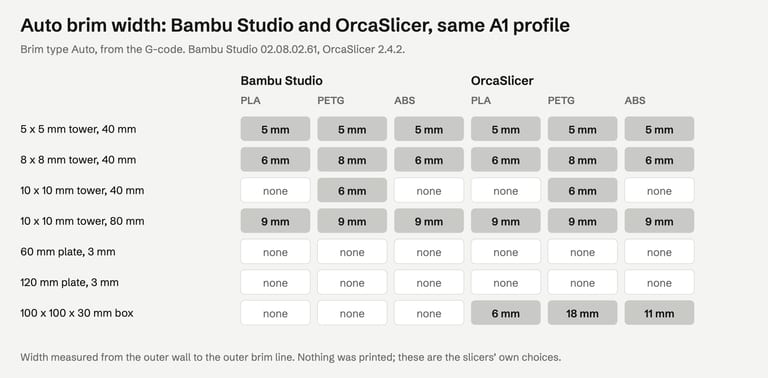
Towers: identical in both apps, including the wider brim for PETG.
The 100 × 100 × 30 mm box: none in Bambu Studio in any material; in OrcaSlicer 6 mm in PLA, 11 mm in ABS and 18 mm in PETG.
The source code explains it. Both apps compute a footprint-and-material term; Bambu Studio 02.08.02.61 multiplies it by zero (Brim.cpp L798), OrcaSlicer 2.4.2 keeps it (Brim.cpp L298), with a shorter "thermal length" for ABS and PETG than for PLA (MaterialType.cpp). The term grows with the part's footprint and with height up to 30 mm, which is why our 3 mm plates got nothing in either app.
So if you move a large ABS or PETG part between the two apps with brim type Auto, the brim can appear or disappear. Check the preview, or set the brim type yourself.
Brim width: what you set and what it costs#
| Brim width set | Bambu Studio: width / filament (cube, 60 mm plate) | PrusaSlicer | Cura (Ender-3) |
|---|---|---|---|
| 3 mm | 2.9 mm / 20 mm, 56 mm | 2.9 mm / 21, 59 mm | 3.2 mm / 36, 100 mm |
| 5 mm | 4.8 mm / 35 mm, 95 mm | 5.0 mm / 40, 106 mm | 5.2 mm / 63, 166 mm |
| 8 mm | 7.5 mm / 62 mm, 157 mm | 7.9 mm / 68, 173 mm | 8.0 mm / 105, 265 mm |
| 10 mm | 9.3 mm / 81 mm, 201 mm | 10.0 mm / 93, 226 mm | 10.0 mm / 139, 339 mm |
Width is measured in the G-code from the part's outer wall to the outer brim line, both as nozzle centre lines; filament is the brim alone, on the 20 mm cube and on a 60 × 60 × 3 mm plate (part: about 1,200 and 2,900 mm). Cura's figures are higher partly because the Ender-3 profile lays a thicker first layer (0.3 mm).
Cost grows with width and with the part's outline. A 10 mm brim on the 60 mm plate was 7% of the plate's own filament in Bambu Studio.
Time barely moves. In Bambu Studio a 5 mm brim added 20 seconds to the cube and 52 seconds to the plate; 10 mm added 46 and 110 seconds.
Bambu Studio's brims came out a little narrower than set, 9.3 mm for 10 mm; PrusaSlicer and Cura matched to within 0.2 mm.
Brim types: outer, inner, ears#
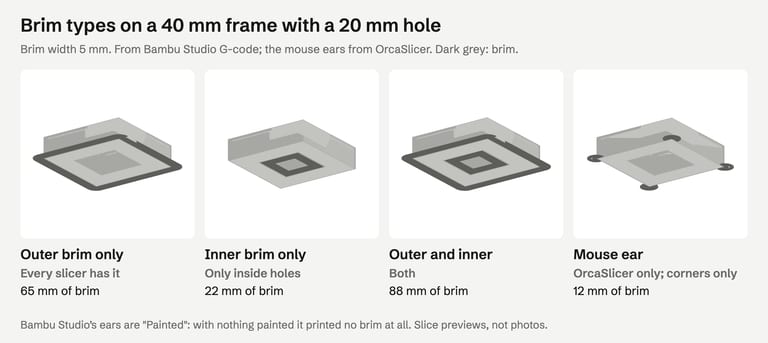
Outer brim only is what most people mean by a brim.
Inner brim goes inside holes in the first layer. On a solid cube, Bambu Studio, OrcaSlicer and PrusaSlicer printed no brim at all with "inner only", as Bambu Lab's wiki says: "The inside brim can only be generated if the object itself has holes inside" (Bambu Lab Wiki).
Mouse ears (OrcaSlicer) are small discs at sharp corners, where lifting usually starts. On our frame, cube and plate they used 12 mm of filament against 35–95 mm for a 5 mm outer brim.
Painted (Bambu Studio): Bambu Studio's ears are painted onto corners in the window (Brim Ears). Its setting is the same
brim_earsvalue as OrcaSlicer's mouse ears (PrintConfig.cpp), but with nothing painted it printed no brim on any of our parts. If you pick Painted, paint something.PrusaSlicer has outer, inner, and outer and inner, no ears (Prusa); Cura has a brim with an "only on outside" option (UltiMaker).
The gap between brim and part#
Every slicer has a setting for it: Brim-object gap (Bambu Studio, OrcaSlicer), Brim separation gap (PrusaSlicer), Brim Distance (Cura). The makers agree on the trade-off: Bambu Lab, "A smaller gap can improve the connection strength while a larger gap will make disassembling easier" (Bambu Lab Wiki); UltiMaker, a gap "makes it easier to remove the brim … but also reduces the effectiveness of the brim" (UltiMaker).
What the G-code shows, as the distance from the part's outer wall to the nearest brim line (centre to centre):
| Gap setting | Bambu Studio (first-layer lines 0.5 mm) | PrusaSlicer built-in (0.4 mm) | Cura (0.4 mm) |
|---|---|---|---|
| 0 mm | 0.64 mm | 0.44 mm | 0.45 mm |
| 0.1 mm | 0.73 mm (default) | 0.53 mm | — |
| 0.2 mm | 0.82 mm | 0.64 mm | 0.63 mm |
| 0.3 mm | 0.91 mm | 0.75 mm | — |
With lines about 0.4 mm wide, a centre-to-centre distance of 0.44 mm means the brim touches the wall: that is PrusaSlicer's built-in default and Cura's. Bambu Studio's lines are 0.5 mm wide on the first layer, so its default leaves a gap of roughly 0.2 mm, and even a gap of 0 left some space; Bambu Lab's wiki puts that down to elephant foot compensation (Bambu Lab Wiki). Each 0.1 mm on the setting moved the brim about 0.1 mm.
We did not print, so we cannot tell you which gap peels cleanly for your material. If a brim leaves a ridge you have to cut off, the gap is the setting to raise; if the brim comes away during the print, lower it.
How we tested#
Bambu Studio 02.08.02.61 and OrcaSlicer 2.4.2 (Bambu Lab A1, 0.4 mm nozzle, 0.20 mm Standard, Textured PEI Plate; Bambu PLA Basic, PETG Basic and ABS; profiles loaded with their full inheritance, as the apps use them), PrusaSlicer 2.9.6 (built-in defaults, 0.4 mm nozzle, 0.2 mm layers; skirt off when measuring brim width and gap) and CuraEngine 5.13.0 with Cura's Creality Ender-3 definitions and Generic PLA, on macOS, from the command line, on 30 October 2026. Widths, gaps and filament were measured from the G-code; times are the slicers' own estimates. Test parts: a 20 mm cube, square towers, 3 mm plates, a 100 × 100 × 30 mm box and a 40 mm frame with a 20 mm hole, all clean solids we generated.
The image at the top of this page is an AI-generated illustration (Higgsfield, GPT Image 2.5), not a photo of a print. The other figures are drawn from the slicers' G-code.
Not tested: actual prints, so how well each option holds a part down, how a brim peels off and what it leaves; the apps' windows, including painting brim ears; other printers' profiles; Cura's app, whose settings our command-line run approximates; materials other than PLA, PETG and ABS.
FAQ#
What is a brim in 3D printing?#
A single-layer band of plastic printed around the first layer of a part and joined to it. It adds contact area with the plate and holds the edges down, which helps tall, narrow parts and materials that shrink. You remove it after printing.
What is the difference between a skirt, a brim and a raft?#
A skirt is a loop around the part that does not touch it and mainly primes the nozzle. A brim is attached to the part's first layer and adds area on the plate. A raft is printed under the part and lifts it. On our 20 mm cube in Bambu Studio they added 4, 35 and 111 mm of filament.
Does Bambu Studio add a brim automatically?#
Yes, with brim type Auto, the default. In our tests it added one only to tall, narrow parts. OrcaSlicer's Auto, with the same profile, also added one to a large 30 mm tall box, wider for ABS and PETG.
How wide should a brim be?#
Prusa suggests at least 3 mm. Bambu Studio and OrcaSlicer default to 5 mm when you choose a brim, Cura to 8 mm. Each extra millimetre adds filament in proportion to the part's outline but almost no time: 20 seconds for a 5 mm brim on a 20 mm cube.
What are mouse ears or brim ears?#
Small discs of brim at a part's sharp corners, where lifting tends to start. OrcaSlicer generates them automatically (brim type Mouse ear); in Bambu Studio you paint them on. On our parts they used a fraction of the filament of a full brim.
Why is there a gap between my brim and the part?#
The brim-object gap setting, 0.1 mm by default in Bambu Studio and OrcaSlicer, plus elephant foot compensation on the first layer. A gap makes the brim easier to remove and holds the part a little less. Set it to 0 if you want the brim joined to the wall.
Sources#
Bambu Lab Wiki: Brim, Brim Ears, Support (raft)
Prusa Knowledge Base: Skirt and Brim
UltiMaker: Build plate adhesion settings; Cura 5.13.0 fdmprinter.def.json, creality_base.def.json
Bambu Studio 02.08.02.61 source: auto brim width, brim types
OrcaSlicer 2.4.2 source: auto brim width, material thermal lengths
FixSTL checks your STL for holes, non-manifold edges, overlapping parts and thin walls in your browser. A brim cannot fix a broken mesh or a base that does not sit flat.
Check the file before you blame the brim